
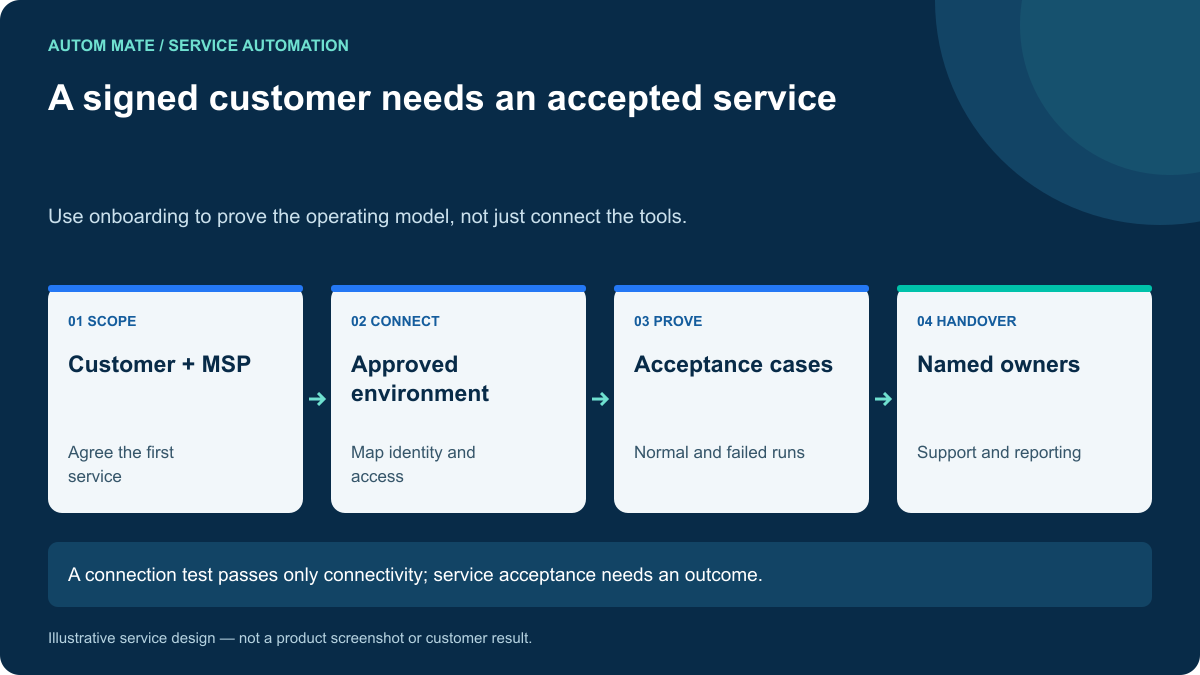
An MSP client onboarding checklist should establish that the provider can deliver and support the agreed service in the customer’s environment. Connected tools, active accounts and a welcome meeting are useful milestones. They do not by themselves prove that an operational request will reach a reliable outcome.
This checklist focuses on onboarding a customer to an automated service. Employee onboarding is one possible service you might deliver, but it is not the whole customer onboarding process.
Choose the first service before connecting everything
Agree one frequent, bounded request that has a clear business owner and a visible result. For example, an approved application entitlement, a routine endpoint check or a standard access removal. Choose a scope where customer policy and target-system permissions can be confirmed.
Write a one-sentence service description: “For approved standard reporting access requests, resolve the employee, apply the agreed role and return the verified result to the service desk.” Then list what is excluded, such as privileged roles, emergency requests or unsupported applications.
A narrow first service creates an acceptance test both teams can understand. It also reveals the decisions that will need to be reused for the next service.
The onboarding checklist
| Area | Required agreement | Evidence before handover |
|---|---|---|
| Scope | Eligible requests, exclusions and completion criteria. | Approved service description. |
| Customer mapping | Tenant, service desk and target environment identifiers. | Correct-context demonstration. |
| Authority | Approvers, service accounts and permitted actions. | Permissions validated for the scoped service. |
| Data | Identity mappings, required fields and source owners. | Sample records validated. |
| Operations | Monitoring, recovery and escalation responsibility. | Runbook exercised by the support team. |
| Acceptance | Normal, duplicate and failed scenarios. | Results linked to agreed cases. |
| Reporting | Customer-visible outcomes and handling measures. | Sample report reviewed. |
| Commercial scope | Included service, support boundaries and change process. | Documented agreement. |
Validate the customer boundary with a real test
Use approved test identities and resources to show that the service resolves the intended customer environment. Do not rely on a successful login to an administration console as evidence of tenant isolation.
Try an unknown customer mapping and a mismatched request reference. Both should produce a controlled exception. Confirm that operators see only the customer information needed for their responsibilities and that exported evidence preserves the same boundary.
Never make access broader simply to get the first demonstration working. Capture missing permissions as a dependency with a named owner. Temporary setup credentials need an explicit removal or transition step.
Give each dependency an owner and a due condition
Onboarding often slows because the next action belongs to “the customer” or “the technical team.” Assign a person or maintained role for identity mapping, application permission, approval policy and operating acceptance.
Track the condition that closes each dependency. “Application access requested” is not equivalent to “scoped connection tested.” “Training completed” is not equivalent to “the on-call operator can recover an exception.”
Keep the checklist close to the service record so commercial and technical teams work from the same status. A separate slide deck should not become the only place that records what remains unresolved.
Prove the exception path before handover
For a fictional standard-access service, test a valid request, an already-satisfied request, a missing identity and an unavailable target. Then have a support operator recover the unresolved case using the runbook.
The operator should be able to see what was requested, which steps happened, what is uncertain and what action is permitted next. If only the original workflow builder can interpret the run, the service is not ready for routine support.
Where an action cannot be reversed automatically, document the compensating action or manual escalation. The customer should understand the recovery boundary before it matters during an incident.
Start the service report during onboarding
A useful first report separates requests received, eligible requests, verified completions, exceptions and manual effort. Add service version and customer context so future changes can be compared sensibly.
Do not promise an ROI number derived from another customer. Use the new customer’s eligible volume and handling baseline. Review how many requests are bypassing the intended channel; low adoption may be a communication or scope issue rather than an automation failure.
What counts as ready?
Ready means the customer and MSP agree the scope, required controls are in place, acceptance cases have passed and support ownership is active. It does not mean every future request will run without an exception.
For reusable delivery, document the differences between this customer and the standard service. A role mapping is configuration; a special approval branch may be a maintained variation. Make that distinction visible before enrolling the next customer.
Use onboarding to establish a repeatable service
Autom Mate MSP Edition provides a platform for delivering configured automation across customer environments. The checklist above defines the evidence to seek for your first service.
Read the MSP evaluation guide, then bring one customer environment and one service to an onboarding workshop. The objective is an accepted workflow with owners, evidence and a clear support path.