
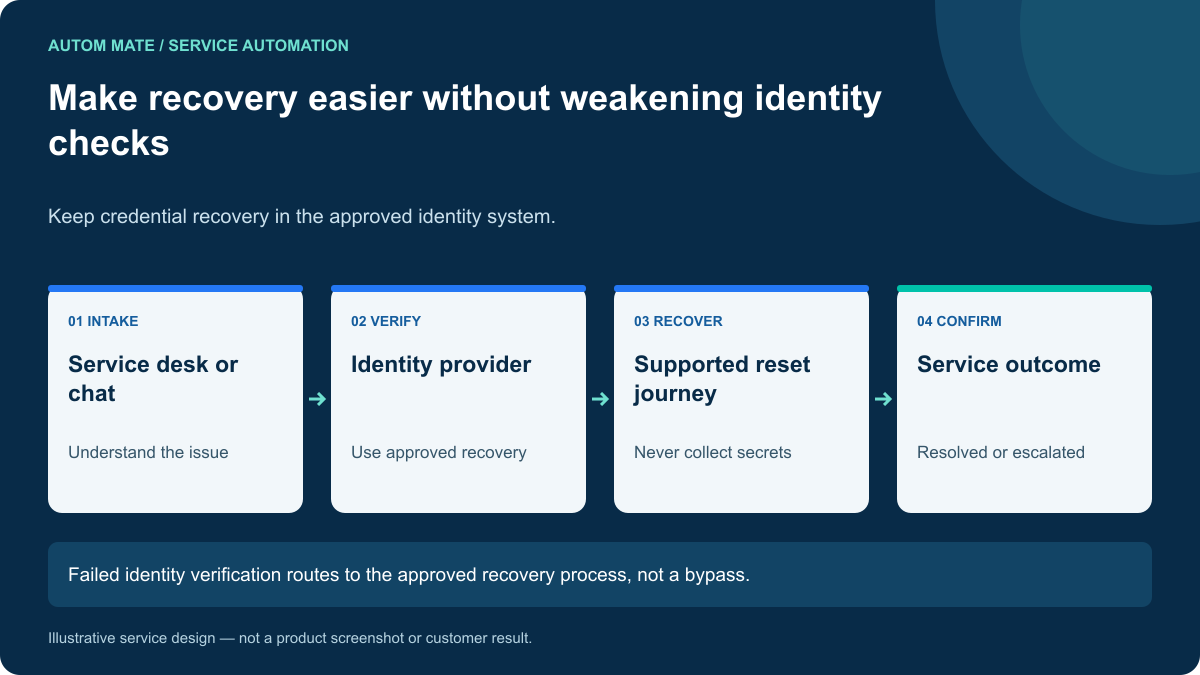
Self-service password reset should let an eligible user recover through the identity provider’s approved verification process, with the service desk coordinating guidance and exceptions around it. A chat conversation can make that journey easier to find. It should not become a substitute for proof of identity.
For IT leaders, the opportunity is broader than a password action: understand the access problem, direct the user to the correct recovery path, preserve the security controls and close the support loop with an accurate outcome.
First determine what is actually broken
“I cannot log in” can describe a forgotten password, a locked account, an expired account, missing application access or a lost authentication device. Resetting a password does not solve all of those conditions.
Collect only the context needed to choose a supported route: the application, the type of problem and an appropriate account reference. Avoid asking users to paste passwords, one-time codes or recovery secrets into a ticket or conversational agent.
A small set of clear choices can be more reliable than an open-ended agent that infers permission from a frustrated user’s message. The service should explain when the next step happens in the identity provider rather than in chat.
Preserve the provider’s recovery requirements
Microsoft documents eligibility, registered authentication methods and reset behavior in its Microsoft Entra self-service password reset guide. A configured service must respect those requirements and the policies applicable to the user’s account.
Do not create a weaker help desk route merely because the user cannot complete self-service verification. That case belongs in the organization’s approved assisted recovery process. Administrative and other sensitive accounts may require different handling.
A practical service journey
| Stage | What the service should do | Evidence to retain |
|---|---|---|
| Classify | Separate password recovery from other access issues. | Issue category and target system. |
| Guide | Direct the user to the approved identity journey. | Route offered and service reference. |
| Recover | Let the identity system perform verification and recovery. | Supported outcome reference, if available. |
| Check | Confirm the relevant problem is resolved. | Provider result or explicitly labeled user confirmation. |
| Escalate | Assign an approved recovery owner when needed. | Failure category and next action, without secrets. |
A successful handoff is not proof that the reset happened. If the provider does not expose a suitable completion signal to your integration, keep that limitation explicit. User confirmation can be useful, but it should not be relabeled as a verified provider event.
Example: a user has lost their authentication device
Consider a fictional employee who asks a Teams assistant to reset their password. The conversation reveals that the problem is actually a lost phone used for verification. Sending the same reset link repeatedly will not help.
The service categorizes the issue and presents the organization’s assisted recovery path. It records the case and routes it to the authorized team. It does not remove authentication factors, grant temporary elevated access or accept knowledge of a manager’s name as sufficient evidence.
Once the authorized recovery process is completed, the service can help the employee return to the correct sign-in route and record the support outcome. The handling record explains which team resolved the exception without exposing the recovery details.
Design the failure paths before promoting the service
Users may be ineligible, unregistered, unable to complete verification or connected to the wrong tenant. A provider can also be unavailable. Each condition should have a clear next step and an owner.
Avoid repeated automated attempts that create more user confusion or unnecessary recovery requests. Keep the correlation between the original support issue and subsequent attempts. If a user starts in Teams and continues through a browser, do not create separate unrelated cases for the same journey.
For MSP delivery, determine customer context before offering a route. A shared support channel must not infer the tenant solely from an unverified display name or loosely matched email domain.
Measure resolution quality as well as deflection
Track eligible journeys started, completed provider outcomes where observable, user-confirmed resolutions, assisted recoveries and repeat contacts. Keep those categories separate.
A lower ticket count can reflect useful self-service, but it can also reflect users giving up. Check whether people return with the same issue and whether unresolved journeys remain discoverable to support.
In a demo, include an eligible user, an unregistered user, a wrong-tenant case and a lost-factor case. The service should be helpful in all four without relaxing the identity policy.
Connect the channel to a governed workflow
Autom Mate can coordinate a configured service journey around the identity provider and service desk. The design should retain the provider’s recovery authority and use conversation for intake, guidance and status.
Explore Teams-based IT support and our AI action and approval matrix. Bring one password recovery journey to a design session, including the exception that currently creates the most repeat contacts.