
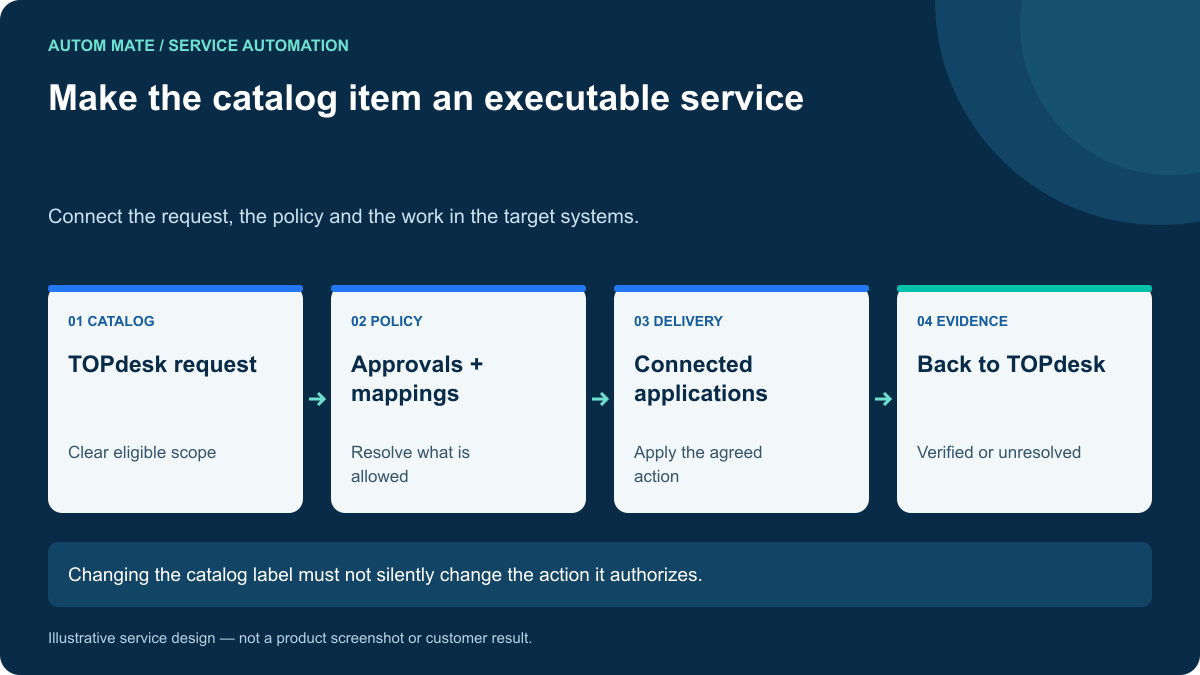
TOPdesk automation can connect a service catalog request to the work that fulfills it across other applications. The catalog item should describe a bounded service with clear inputs, authority and completion criteria. Otherwise, automation inherits the ambiguity that technicians previously resolved by hand.
Choose one request that repeatedly leaves TOPdesk for manual action elsewhere. A standard application role, a shared resource change or a routine software request is often easier to reason about than a broad “IT assistance” item.
Make the catalog item precise enough to execute
A useful item explains who can request it, what the requester receives, which approval is needed and which information is mandatory. It should also explain when the standard service does not apply.
For example, “Reporting application access” may need a role choice, business reason and time limit. It should not allow arbitrary privileged access simply because the requester typed it into a description. Keep catalog choices mapped to maintained, approved target actions.
Start by reviewing the last few requests of this type with the team that fulfills them. Their manual decisions reveal missing inputs, inconsistent mappings and recurring exceptions.
Separate the request record from the action contract
| TOPdesk context | Execution requirement |
|---|---|
| Requester and affected person | Resolve the intended account using a reliable identifier. |
| Selected catalog service | Map to a versioned, approved action scope. |
| Approval status | Confirm a current decision for the exact request. |
| Customer or department | Choose the correct policy and connected environment. |
| Requested completion | Define a supported target-state check. |
| Support ownership | Route exceptions to an accountable team. |
The names and storage locations of those values depend on your TOPdesk configuration. This is a design contract, not a set of assumed field names or a ready-to-run API recipe.
An example: standard software access
Consider a fictional employee requesting a maintained reporting role. The service desk collects the request and its approval. A configured workflow then resolves the employee’s target account, inspects current access and determines the required change.
If the role already exists, record that the request is satisfied without granting it again. If the target account cannot be resolved, keep the service open and explain the missing dependency. If additional licensing is required, route that decision to its owner before attempting the grant.
After applying an approved change, verify the relevant state where the target supports it. Return a short human-readable outcome to TOPdesk, including any unresolved component and its owner.
The technician should be able to understand the result from the service record. A raw API response alone is rarely a useful customer-facing completion note.
Keep native responsibilities clear
Review the automation and integration already configured in TOPdesk before adding another path. If a supported native mechanism owns a decision or action successfully, retain that ownership and coordinate the surrounding steps.
Autom Mate’s TOPdesk integration offering focuses on connecting the service environment to other tools. The exact operations, authentication and field mappings should be confirmed for the customer’s configuration.
A connector label establishes neither complete workflow coverage nor permission to act. Validate the required read, write and outcome-check operations during the design session.
Plan for catalog and policy changes
Service catalog wording evolves. An application role may be renamed, a department may change approval rules or a target system may introduce a new prerequisite. Identify who reviews the effect on the execution mapping.
Keep a record of the service version used for a request. A delayed approval should not unexpectedly execute a materially different action after the catalog is updated. Where the requested scope changes, obtain the appropriate new decision.
For partner or MSP delivery, separate the common workflow from customer-specific configuration. A catalog item with the same display name can have different meaning in two customer environments.
Test a complete request, including the awkward cases
- The requester selects a standard role and all required data is present.
- The account already has the requested access.
- The approval is withdrawn before execution.
- The target system is unavailable.
- The target change succeeds but the service-record update fails.
- A catalog mapping changes while a request is waiting.
Each case should end in an accurate, understandable state. A communication failure should not repeat a completed target action. A missing prerequisite should not disappear behind a generic “automation failed” message.
Measure fulfillment rather than notification volume
Track eligible request volume, verified completions, manual touches and time after approval. Review repeat contacts: employees asking “is my access ready?” often reveal an incomplete status or verification loop.
Use those results to improve the selected service before expanding the catalog. The first objective is a repeatable outcome the support team can operate confidently.
Explore the broader access request management pattern, then bring one TOPdesk catalog item to a fulfillment workshop. Include an ordinary request and an exception that currently requires a technician to intervene.